


Simply Sing: My Singing App
4.411.54K Reviews
App Specs
- Version
- 2.12.0
- Updated On
- License
- Free
- Downloads
- 10,000,000+
- Developer
- Simply Ltd
- Categories
- Music & Audio
- Platform
- Android, iOS
Screenshots

 Analysis by AppCompare
I find that singing apps are easiest to judge when you try them in an ordinary moment, not during a perfect, quiet demo. A song can feel comfortable in your head and suddenly awkward once you hear your voice through a phone. Simply Sing is aimed at making that first step less intimidating: it gives casual singers a way to sing along and think about how they sound, without needing to turn practice into a formal lesson.
It’s a music and audio app from Simply Ltd, and its appeal is pretty specific: you want to sing, but you may not know where to start or whether a song suits your voice. I’d look at it as a guided, at-home singing companion rather than a replacement for a vocal teacher or a full recording studio. That distinction matters, because the app is most useful when you treat its feedback as a prompt to practise, not as a verdict on your talent.
Where singing apps can trip you up
The first hurdle is often not the singing itself but getting comfortable enough to begin. A track that feels easy to listen to may sit awkwardly in your range, and singing in a room with other people around can make even a confident person hold back. The app’s focus on making songs approachable is useful here, but it can’t remove the normal self-consciousness of hearing your own voice. I’d start with a song you already know well, rather than choosing something ambitious just because it sounds impressive.
There’s also a difference between an encouraging score and useful practice. Feedback can help you notice where pitch or timing needs attention, but a single performance is only a snapshot. If you are tired, distracted, or rushing through a chorus, the result may say more about that moment than about your ability. I get better value from repeating a short passage with one clear goal than from singing several songs quickly and treating the results as a ranking.
Setup checks that make a session smoother
Because singing depends on hearing both the track and your own voice, the setup around the phone can make a noticeable difference. Find a spot where you can sing at a natural volume without needing to compete with television or conversation. If the backing track is too loud, it is harder to judge your pitch; if it is too quiet, you may push your voice unnecessarily. A comfortable balance is more helpful than turning everything up.
Before starting, check that the device is positioned steadily and close enough for you to use the screen without twisting away from the microphone. Avoid covering the microphone with your hand or resting the phone against fabric. These are simple checks, but they can prevent a session from feeling oddly unresponsive. If a performance sounds different from what you expected, try another take from the same position before assuming the app or your voice is the problem.
It also helps to separate song choice from practice goals. If you are exploring the library, pick something you enjoy and sing for fun. If you are trying to improve, choose one familiar track and listen for a specific challenge, such as entering on time or keeping a phrase steady. This makes the app’s feedback easier to use and keeps a casual session from becoming frustrating.
Worth Reading Before You Choose

EA SPORTS FC Mobile 26 Is a Bigger Football Game, but It Takes Time

Flipboard Shows What News Apps Must Do Beyond the Feed

Switching to Android Auto Means Rethinking Your Driving Routine

Google Calendar Makes a Crowded Week Easier to Manage

Ludo King Makes the Most of the Minutes Between Plans

Baby Panda World Brings Quick Play to Modern Phones, but Its Game Library Feels Busy
Recovering a session when a take goes wrong
A missed lyric or a late entrance does not mean you need to abandon the whole session. I would pause, take a breath, and restart the song rather than trying to chase the beat after losing your place. If a second attempt has the same problem, lower the difficulty of the task in your own way: focus on the verse, sing more gently, or choose a track whose melody is easier to follow. The point is to make the next take informative, not to force a perfect result.
When the feedback is disappointing, compare takes made under similar conditions. Changing the room, phone position, or volume between attempts makes it hard to tell whether your singing changed or your setup did. A short sequence of consistent attempts is more revealing than a long session full of variables. I’d also stop if your throat feels strained; the app can encourage practice, but it cannot judge physical discomfort for you.
When the app may not be the cause
If a song feels difficult, the issue may be the key, the melody, or simply that the tune is unfamiliar. Likewise, a recording that seems weak may come from background noise, an awkward phone position, or singing too quietly to hear yourself clearly. Trying a familiar song in a calmer spot is a sensible first check. It gives you a better basis for deciding whether the challenge is the material, the environment, or your technique.
And if you are looking for detailed music theory, structured vocal exercises, or a teacher who can respond to your individual technique, a karaoke-style app may not be enough. I would use it for approachable repetition and confidence-building, then look elsewhere for sustained, personalised instruction. That is not a flaw so much as a question of choosing the right tool for the job.
Getting Started with Your Personal Karaoke Machine
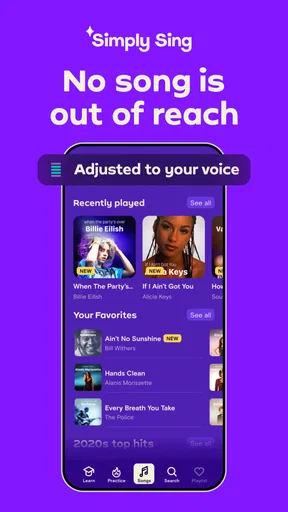
The first thing that struck me when I downloaded Simply Sing was how user-friendly it is. You don’t need to be a tech wizard to navigate this app. Just sign up, and you’re greeted with a sleek and intuitive interface. You’ll feel like you’re stepping into a virtual music studio. The app offers a vast library of songs across various genres, so whether you’re into pop, rock, or even classical, there’s something for everyone.
When I first opened the app, I was prompted to select songs based on my preferences. This personalized touch made it feel like the app was tailor-made for my tastes, which is a nice touch. You can jump right into singing along with your favorite tracks or take your time exploring new tunes.
Features That Hit the Right Note
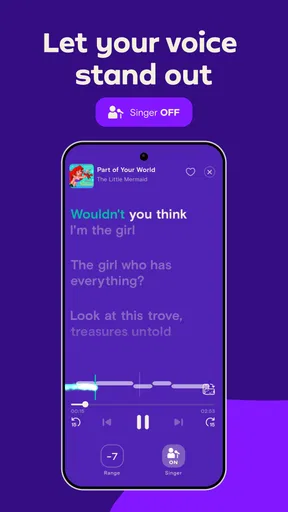
One of the standout features for me was the real-time pitch correction. As someone who tends to go off-key more often than not, this feature was a lifesaver. It subtly adjusts your pitch as you sing, making you sound like a pro even if you're just starting out. It’s like having your vocal coach right there with you.
Another feature I loved is the feedback system. After each performance, the app provides detailed feedback on your pitch, rhythm, and overall performance. It’s like having Simon Cowell’s constructive criticism without the snark. The feedback is constructive and encourages you to improve without being overly critical.
- Song Library: A treasure trove of songs from all your favorite artists.
- Real-Time Pitch Correction: Makes you sound like a seasoned singer.
- Feedback System: Offers insights to help you improve.
Sing Solo or Jam with Friends
Feeling a bit social? The app lets you collaborate with friends or other users worldwide. You can join a duet or a group performance, which is a fantastic way to connect with other music lovers. I tried a duet with a friend, and it was a blast! It felt like we were performing on stage together, even though we were miles apart.
If you’re a little shy about singing in front of others, don’t worry! You can always choose to sing solo and keep your recordings private. It’s all about what makes you feel comfortable.
A Few Notes to Keep in Mind
While Simply Sing is a fantastic app, it’s not without its quirks. The free version offers a decent selection of songs, but if you want access to the full library, you’ll need to consider a subscription. It’s a small price to pay for the sheer joy and improvement you’ll experience in your vocal journey.
Also, while the pitch correction is great, it’s important to remember that it’s not a magic wand. You still need to practice and hone your skills, but it definitely gives you the confidence to keep going.
Choosing it over a playlist or karaoke track
A regular music player is better when I only want to listen, and a basic karaoke track can be enough when all I need is lyrics and a backing arrangement. The reason to choose this app instead is the singing-focused feedback and pitch support described above. Those tools give a casual session a learning angle, even if they do not turn it into formal coaching. If sharing performances is the main attraction, social karaoke options may suit you better; if you prefer private repetition and a little guidance, this app is the more relevant fit.
A practical routine I like is to use one song in three passes: first sing it without stopping, then focus on the part that felt least secure, and finally sing it through again at a relaxed volume. That avoids obsessing over every note and makes the feedback easier to interpret. It is also a useful way to keep sessions short enough to repeat on another day instead of pushing until your voice feels tired.
Who will get the most from it
I’d recommend it to someone who enjoys singing at home, wants gentle structure, and is willing to practise the same song more than once. It can also suit a friend or family member who wants a low-pressure activity: one person can choose a familiar track, while the other listens or joins in. For a weekday evening, that is an easy way to turn a few spare minutes into something more engaging than scrolling through music without actually singing.
It is less suited to a singer who wants detailed technical instruction, precise control over every recording choice, or a complete substitute for live feedback from a teacher. People who mainly want a catalogue of backing tracks may prefer a simpler karaoke app, while people who want to improve through lessons may be better served by a dedicated learning resource. I see this as a middle ground: more interactive than simply singing over a playlist, but not a comprehensive vocal course.
There is a useful trade-off in the app’s approachable style. It can make starting easier, but pitch correction may also make a take sound more polished than your unprocessed voice would. I would not use that polished result as proof that technique is already settled. For practice, pay attention to the notes and timing you can reproduce comfortably, and treat the correction as support rather than a measure of what your voice can do unaided.
Everyday use, access, and value
For an ordinary use case, imagine having a little time before dinner and wanting to sing one song you already know. I would choose it from the library, keep the phone in a stable position, and do a relaxed first take. If a phrase feels off, I would repeat that song later rather than turning the evening into a test. That kind of small, repeatable session is where the app makes the most sense: it brings a song and a bit of feedback together without asking you to plan a full lesson.
The app is free to download, though some purchases are offered within it, with listed items ranging from $6.99 to $89.99. I would explore how the available access fits my own habits before paying: if I only sing occasionally, a limited selection may be enough; if I return often and want more song choice, paid access may matter more. The free starting point lowers the barrier to trying it, but it is worth checking the purchase terms in the app before committing to anything.
It is rated for Everyone, has an average rating of 4.3 from around 271,000 ratings, and has been installed over 5 million times. Those figures suggest that it has found a broad audience, but they do not tell me whether it matches an individual singer’s preferred songs or practice style. I would make that decision based on the library and the way its feedback feels during a real session.
A grounded verdict for your singing routine
Simply Ltd’s app was released on January 11, 2024, and version 2.11.9 requires Android 8.0 or later. Those details are useful to check before downloading, especially if you are setting it up on an older device. The broader point is that this is a focused music and audio tool: its value depends less on how often you open it and more on whether singing with a little feedback makes you want to practise again.
After spending time with Simply Sing, I can wholeheartedly recommend it to anyone looking to improve their singing skills or just have fun. It’s a delightful mix of education and entertainment, and with its easy-to-use interface and interactive features, it makes learning to sing enjoyable.
If you’re ready to step up your singing game or just want to have some musical fun, give Simply Sing a try. Who knows? You might just discover your hidden talent!
Ready to start your singing journey? Download Simply Sing and let your voice shine!
Pros
- Easy-to-use interface for beginners
- Wide range of popular songs available
- Real-time feedback on singing
- Fun and engaging visual design
- Supports multiple languages
Cons
- Limited free features without subscription
- Occasional app crashes reported
- Requires stable internet connection
- Some songs lack full versions
- Ads can be disruptive at times
FAQs for Simply Sing: My Singing App
What features does Simply Sing offer for beginners?
Simply Sing provides a range of features tailored for beginners, including guided lessons and vocal exercises to help improve your singing skills. The app offers real-time pitch correction and feedback, making it easy for novices to stay on key. Additionally, the user-friendly interface and comprehensive tutorial videos ensure a smooth learning experience.
Is Simply Sing suitable for advanced singers?
Yes, Simply Sing caters to singers of all levels. Advanced singers can benefit from the app’s detailed analytics and customizable practice sessions. With a vast library of songs across different genres, advanced users can challenge themselves with more complex pieces and refine their technique through precise feedback.
How does Simply Sing ensure user engagement?
Simply Sing keeps users engaged through a variety of interactive features such as daily challenges, achievements, and a vibrant community of fellow singers. Users can participate in singing battles, share their performances, and receive feedback from the community, making the learning process fun and social.
Are there any subscription options for Simply Sing?
Simply Sing offers both free and premium subscription options. The free version provides access to basic features and a limited song library, while the premium subscription unlocks additional songs, advanced analytics, and personalized feedback. Users can choose between monthly and annual plans for the premium version, with discounts available for long-term commitments.
What are the system requirements for Simply Sing?
Simply Sing is compatible with both Android and iOS devices. For optimal performance, Android users should have version 5.0 or higher, while iOS users need version 11.0 or later. The app also requires a stable internet connection to access the song library and online features. Ensure your device meets these specifications for a seamless experience.


